


Why use Commented instead of Ruttl?
Both Commented and Ruttl offer valuable features for project collaboration and feedback. Your choice will depend on your specific needs and preferences. We hope this comparison has been helpful in guiding your decision.
Start using Commentedcomparison

Discover Commented's features
📍 Drop a pin
Effortlessly drop pins to add comments wherever you need.

✏️ Use annotation
Boost communication by highlighting with ease using the annotation tool.

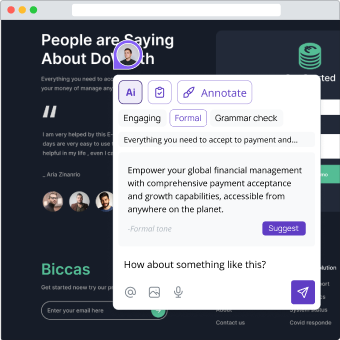
🤖 AI Suggestions
Opt for a professional tone by leveraging AI for a polished approach.
☑️ Status & labels
Streamline collaboration by adding status to your comments effortlessly.

🚨 Use stamps
Indicate something critical by leaving sirens stamp.

Here's what our customers have to say about us here at Commented


“"With commented and it's Slack integration, it just cuts out all the noise making commenting and collaboration seamless. We've seen at least 70% reduction in time spent on this exercise with projects so far."”
Integrations
Seamless integration transforms collaboration. Commented effortlessly connects with your favorite tools, enhancing your workflow and propelling your projects forward.


Efficient Collaboration, Effortless Steps
We believe that commenting should be seamless and straightforward. That's why we've designed a powerful yet user-friendly four-step process to help you achieve excellence in your projects effortlessly.

1. Integrate
Add the code snippet or install the Chrome extension

2. Comment
Leave precise comments directly on your live projects

3. Collaborate
Share your thoughts with team members or clients

4. And beyond
Share conversations on your favourite tool with integrations
Frequently asked questions
If you can't find the question you are looking for, contact us or visit our help center.
What is Commented.io?
Commented.io is a web-based platform that allows users to easily add comments and annotations to any web content. It's a collaborative tool designed to enhance online discussions and facilitate feedback on web sites, apps, articles, blogs, and more.
Is there a free trial available?
Yes, we offer a free trial. You can sign up and try out all the features before making a commitment.
What payment methods do you accept?
We accept all major credit cards, including Visa, Mastercard, American Express, and Discover.
Is my data secure on Commented.io?
We take data security seriously. Your comments and annotations are stored securely, and we do not share your personal information with third parties. For more details, please review our privacy policy.
Can I cancel my subscription at any time?
Yes, you can cancel your subscription at any time. Your account will remain active until the end of the current billing cycle.
Do you offer refunds?
We do not offer refunds for subscription fees. However, you can cancel your subscription at any time to avoid future charges.
How secure is my payment information?
We take security very seriously and use industry-standard encryption to protect your payment information. Your data is safe with us.
Can't decide?
Let's have a 15 minutes call and answer your questions about Commented.